
What is g_form?
g_form is the global object used to access the GlideForm client-side API in ServiceNow.
It allows us to interact with the form currently displayed to a user. We can retrieve field values, set values, display messages, make fields mandatory, hide fields, make fields read-only, and control other aspects of the form.
For example:
g_form.setValue(‘short_description’, ‘Laptop not working’);
This sets the Short description field to Laptop not working on the current form.
Why do we use g_form?
We use g_form when we want the form to respond dynamically to user actions without requiring the user to reload the page.
Common requirements include:
- Automatically populate a field.
- Make a field mandatory under certain conditions.
- Hide fields that are not relevant.
- Display validation messages.
- Make fields read-only.
- Clear fields when another field changes.
- Prevent form submission when input is invalid.
- Change available choices in a choice field.
Where can we use g_form?
The most common place is a Client Script.
Types of g_form method :-
1. Reading methods
getValue()
Returns the current value of a field on the form.
Syntax : g_form.getValue(fieldname’));
Code:
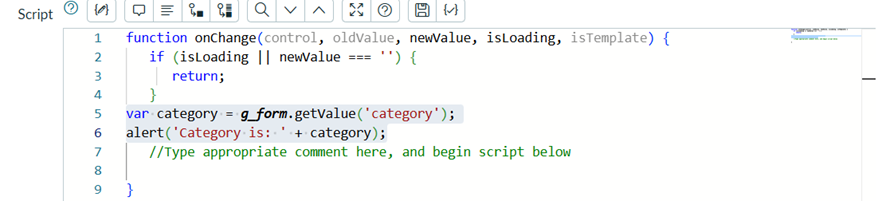
Output:

isMandatory()
Returns true or false: whether the field must have a value before the record can be saved or submitted.
Syntax : g_form.isMandatory(‘fieldname’);
Code:

Output:

isNewRecord()
Returns true when the record has never been saved.
Syntax : g_form.isNewRecord();
Code:

Output:

getBooleanValue()
Returns a real true or false for a checkbox, instead of the strings ‘true’ and ‘false’.
Syntax : g_form.getBooleanValue(‘checkbox field’);
Code:

Output:

getIntValue() and getDecimalValue()
Return the field value as a number.
Syntax : g_form.getIntValue(‘field_name’);
g_form.getDecimalValue(‘field_name’);
Code:
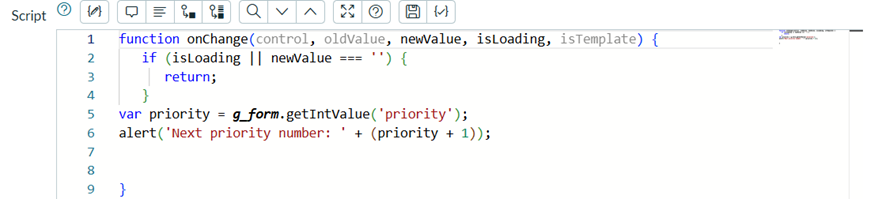
Output:

getTableName()
Returns the table name of the current record.
Syntax : g_form.getTableName());
Code:

Output:

getUniqueValue()
Returns the sys_id of the current record.
Syntax : g_form.getUniqueValue());
Code:

Output:

getLabelOf()
Returns the label shown on screen for a field name.
Syntax : g_form.getLabelOf(‘fieldname’));
Code:

Output:

2. Writing methods
setValue()
Sets the value of a field.
Syntax : g_form.setValue(‘fieldname’, ‘value’);
Code:

Output:

clearValue()
Removes the value from a field.
Syntax : g_form.clearValue(‘fieldname’);
Code:

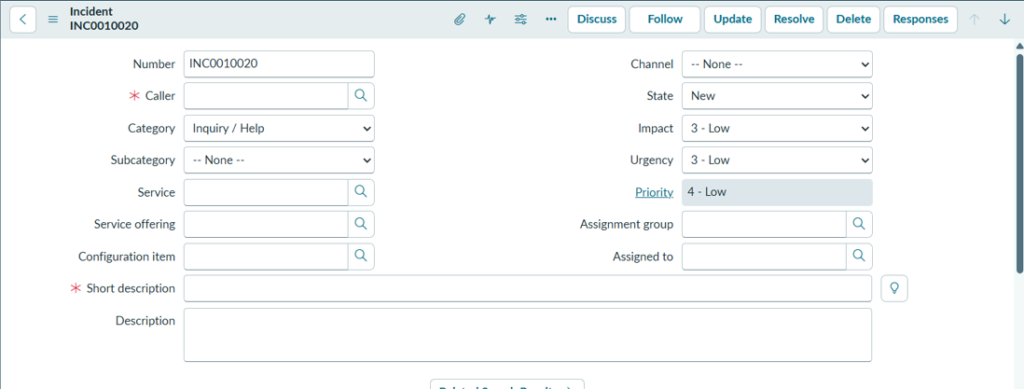
Output:
3. Field state: read-only, mandatory, show and hide
setDisabled()
Makes a field read-only. A UI Policy is the best practice instead of this method.
Syntax : g_form.setDisabled(‘fieldname’, true/false);
Code:

Output:

setReadOnly()
Newer counterpart of setDisabled(). Pass false to unlock the field.
Syntax: g_form.setReadOnly(‘fieldname’, true/false);
Code:

Output:

setMandatory()
Makes a field mandatory. A UI Policy is the best practice instead of this method.
Syntax : g_form.setMandatory(‘fieldname’, true/false);
Code:

Output:

setDisplay()
Hides and unhides a field and collapses its space.
Syntax : g_form.setDisplay(‘fieldname’, true/false);
Code:

Output:

setVisible()
Hides a field but keeps its space on the form.
Syntax : g_form.setVisible(‘fieldname’, true/false);
Code:

Output:

4. Messages
addInfoMessage()
Adds an information message at the top of the form.
Syntax : g_form.addInfoMessage(‘meassage’);
Code:

Output:

addErrorMessage()
Adds an error message at the top of the form.
Syntax : g_form.addErrorMessage(‘message’);
Code:

Output:

clearMessages()
Removes all information and error messages from the top of the form.
Syntax : g_form.clearMessages();
Code:

Output:

showFieldMsg()
Shows an info, error or warning message under a field. If the field is off screen, the form scrolls to it.
Syntax : g_form.showFieldMsg(‘field_name’, ‘message text’, ‘info|error|warning’);
Code:

Output:

hideFieldMsg()
Hides the last message placed by showFieldMsg(). Pass true to clear all messages on the field.
Syntax : g_form.hideFieldMsg(‘fieldname’, true);
Code:

Output:

hideAllFieldMsgs()
Clears every field message on the form at once.
Syntax : g_form.hideAllFieldMsgs();
Code:

Output:
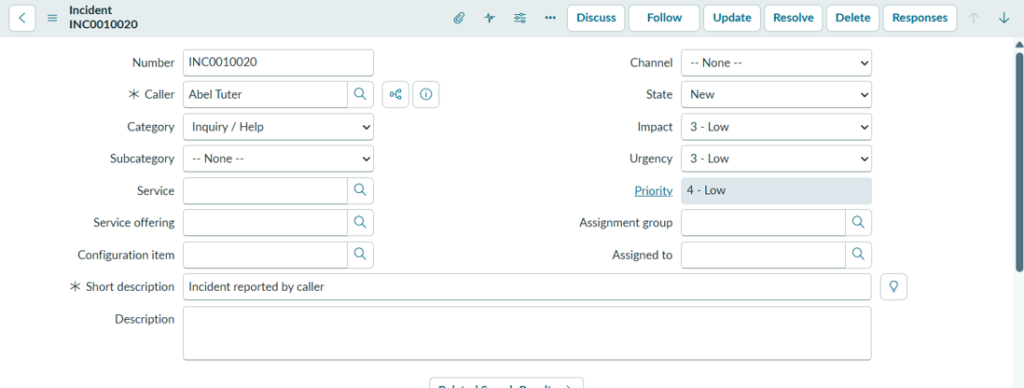
flash()
Briefly highlights a field with a colour.
Syntax : g_form.flash(‘fieldname’, ‘#hex colour’, 0);
Code:

Output:

5. Choice lists
addOption()
Adds a new choice to a choice field: field name, value, label.
Syntax : g_form.addOption(‘fieldname’, ‘value’, ‘label’);
Code:

Output:

removeOption()
Removes one choice, identified by its value.
Syntax : g_form.removeOption(‘fieldname’, ‘value to remove in number ‘1’’);
Code:

Output:

clearOptions()
Removes all options from the choice list.
Syntax : g_form.clearOptions(‘fieldname’);
Code:

Output:

6. Related lists, attachments and sections
showRelatedLists()
Shows all related lists on the form.
Syntax : g_form.showRelatedLists();
Code:

Output:

hideRelatedLists()
Hides all related lists on the form.
Syntax : g_form.hideRelatedLists();
Code:

Output:
7. Save and submit
save()
Saves the record and keeps the user on the form.
g_form.save();
submit()
Saves and completes the normal submit flow, so the user leaves the form.
g_form.submit();