
1. Introduction
In ServiceNow, sometimes we need to fetch information from the server without reloading the form. For example, when a user selects a caller on an Incident form, we may want to automatically populate their email address or manager.
We can achieve this using GlideAjax and a server-side Script Include.
GlideAjax provides three methods to handle the server’s response:
- getXML()
- getXMLWait()
- getXMLAnswer()
Let’s understand each method with simple examples.
2. What is getXML()?
getXML() sends an asynchronous request to the server. This means the browser does not have to wait for the server response before continuing other work.
When the server responds, a callback function processes the response.
Example: Automatically populate the caller’s email address on an Incident form.
Step 1: Create a Client Callable Script Include
Name: CallerUtil

Make sure Client callable is enabled on the Script Include. The application scope may require an appropriate Script Include name or access configuration.
Step 2: Create an onChange Client Script
Table: Incident
Field: Caller
Type: onChange

Here, u_caller_email is a custom email field on the Incident form.
How does it work?
- The user selects a caller.
- GlideAjax sends the caller’s sys_id to the Script Include.
- The Script Include retrieves the user’s email address.
- getXML() receives the response through its callback.
- The email field is populated without reloading the form.
Key point: getXML() is asynchronous and provides the full XML response, which you can process in the callback function.
3. What is getXMLWait()?
getXMLWait() sends a synchronous request. The browser waits until the server responds before continuing.
Example

How does it work?
- GlideAjax sends the request.
- The browser waits for the server response.
- After receiving the response, getAnswer() retrieves the answer.
- The email field is populated.
Important: getXMLWait() blocks the browser while waiting. It is generally discouraged in client-side ServiceNow scripting and may be unavailable or restricted in certain client contexts. Prefer getXML() or getXMLAnswer() instead.
4. What is getXMLAnswer()?
getXMLAnswer() is an asynchronous method that passes the returned answer directly to a callback function.
Unlike getXML(), you do not need to extract the answer from the XML response yourself.
Example
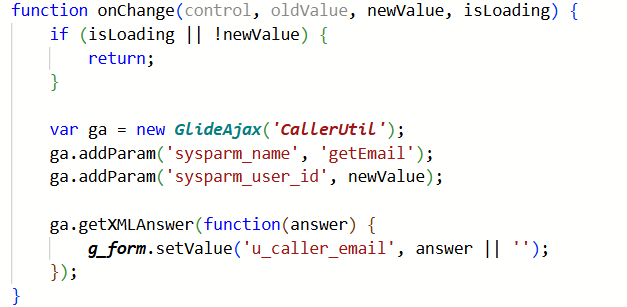
How does it work?
- The user selects a caller.
- GlideAjax calls the getEmail function in the Script Include.
- The server returns the email address as a string.
- The callback receives the email directly in answer.
- The email field is populated.
Key point: getXMLAnswer() is usually the simplest option when you only need the value returned by the Script Include.
5. Difference Between the Three Methods
| Feature | getXML() | getXMLWait() | getXMLAnswer() |
| Request type | Asynchronous | Synchronous | Asynchronous |
| Callback | Yes | No | Yes |
| Response | XML response | Waits for response | Answer value directly |
| Browser blocking | No | Yes | No |
| Recommended usage | When XML processing is needed | Generally avoid | When only the returned value is needed |
6. Which Method Should You Use?
- Use getXML() when you need to process the full XML response.
- Use getXMLAnswer() when you need a simple value, such as email, manager, location, or a status.
- Avoid getXMLWait() in normal client-side scripting because it blocks the browser and can make the form unresponsive.
7. Conclusion
GlideAjax helps ServiceNow developers retrieve server-side information from client-side scripts without refreshing the form.
Understanding these three methods helps you write better Client Scripts and create dynamic forms.
For most everyday use cases, such as automatically populating caller information, getXMLAnswer() is the easiest choice. When the full XML response is required, use getXML().