What is GlideAggregate?
- A server-side API that extends Glide Record to run aggregate queries (COUNT, SUM, AVG, MIN, MAX) on a table.
- The database does the calculation and returns only the result, not every record.
Why use GlideAggregate?
- Much faster than looping through GlideRecord and counting in script.
- Uses less memory, because records are not loaded one by one.
- Supports grouping and filtering on the result (like SQL GROUP BY and HAVING).
When should you use GlideAggregate?
- You need a count, total, average, minimum or maximum.
- You need numbers grouped by a field (e.g., incidents per priority, per assignment group).
- Use GlideRecord instead when you need to read or update the records themselves.
How do you use GlideAggregate?
- Create the object: new GlideAggregate(‘table_name’).
- Add filters with addQuery() or addEncodedQuery().
- Add the calculation with addAggregate(‘TYPE’, ‘field’) and optionally groupBy(‘field’).
- Run query(), then read results with getAggregate(‘TYPE’, ‘field’) inside next().
- Test scripts in All → System Definition → Scripts – Background.
What are the types of GlideAggregate?
COUNT
- Counts the records that match the query.
- Example: number of active incidents.
var ga = new GlideAggregate(‘incident’);
ga.addQuery(‘active’, true);
ga.addAggregate(‘COUNT’);
ga.query();
if (ga.next()) {
gs.info(‘Active incidents: ‘ + ga.getAggregate(‘COUNT’));
}
Output:

COUNT with groupBy
- Counts records per value of a field.
- Example: active incidents per priority.
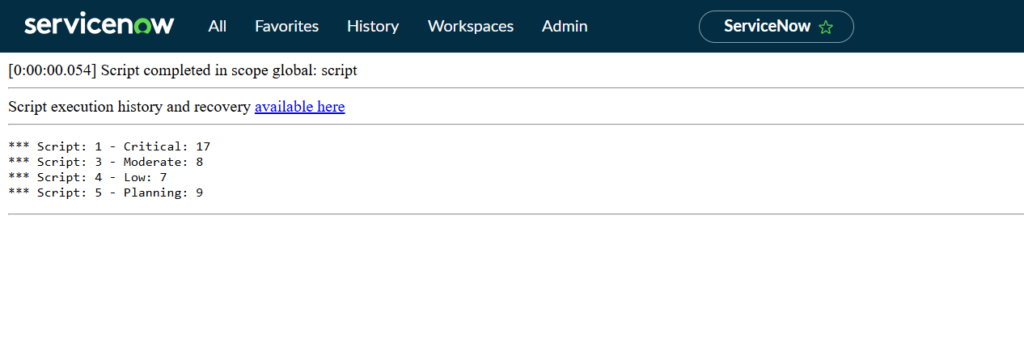
var ga = new GlideAggregate(‘incident’);
ga.addQuery(‘active’, true);
ga.addAggregate(‘COUNT’);
ga.groupBy(‘priority’);
ga.query();
while (ga.next()) {
gs.info(ga.getDisplayValue(‘priority’) + ‘: ‘ + ga.getAggregate(‘COUNT’));
}
Output:
COUNT(DISTINCT)
- Counts unique values of a field.
- Example: number of different callers who raised incidents.
var ga = new GlideAggregate(‘incident’);
ga.addAggregate(‘COUNT(DISTINCT’, ‘caller_id’);
ga.setGroup(false);
ga.query();
if (ga.next()) {
gs.info(‘Unique callers: ‘ + ga.getAggregate(‘COUNT(DISTINCT’, ‘caller_id’));
}
Output:

SUM
- Adds up the values of a numeric field.
- Example: total reassignment count across active incidents.
var ga = new GlideAggregate(‘incident’);
ga.addQuery(‘active’, true);
ga.addAggregate(‘SUM’, ‘reassignment_count’);
ga.setGroup(false);
ga.query();
if (ga.next()) {
gs.info(‘Total reassignments: ‘ + ga.getAggregate(‘SUM’, ‘reassignment_count’));
}
Output:

AVG
- Returns the average of a numeric field.
- Example: average reassignment count per assignment group.
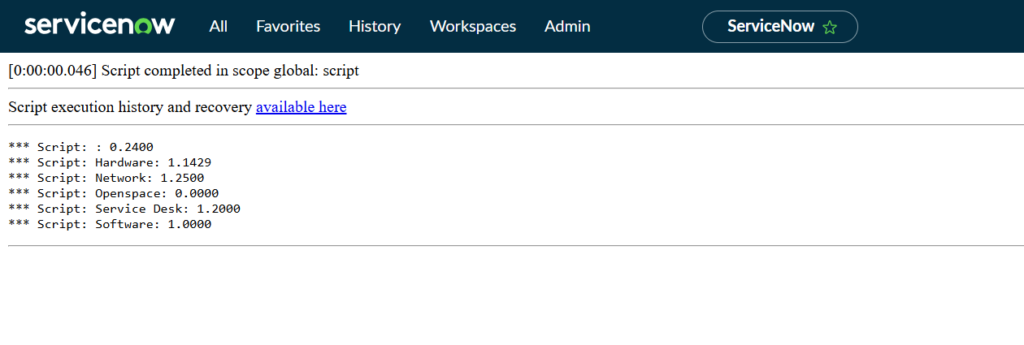
var ga = new GlideAggregate(‘incident’);
ga.addAggregate(‘AVG’, ‘reassignment_count’);
ga.groupBy(‘assignment_group’);
ga.query();
while (ga.next()) {
gs.info(ga.getDisplayValue(‘assignment_group’) + ‘: ‘ + ga.getAggregate(‘AVG’, ‘reassignment_count’));
}
Output:
MIN and MAX
- Return the smallest and largest value of a field.
- Example: oldest and newest open date of active incidents.
var ga = new GlideAggregate(‘incident’);
ga.addQuery(‘active’, true);
ga.addAggregate(‘MIN’, ‘opened_at’);
ga.addAggregate(‘MAX’, ‘opened_at’);
ga.setGroup(false);
ga.query();
if (ga.next()) {
gs.info(‘Oldest: ‘ + ga.getAggregate(‘MIN’, ‘opened_at’));
gs.info(‘Newest: ‘ + ga.getAggregate(‘MAX’, ‘opened_at’));
}
Output:

addHaving (filter on the result)
- Keeps only groups whose aggregate meets a condition, like SQL HAVING.
- Example: assignment groups with more than 10 active incidents.
var ga = new GlideAggregate(‘incident’);
ga.addQuery(‘active’, true);
ga.addAggregate(‘COUNT’);
ga.groupBy(‘assignment_group’);
ga.addHaving(‘COUNT’, ‘>’, ’10’);
ga.query();
while (ga.next()) {
gs.info(ga.getDisplayValue(‘assignment_group’) + ‘: ‘ + ga.getAggregate(‘COUNT’));
}
Output:

orderByAggregate
- Sorts groups by the aggregate value.
- Example: categories with the most incidents first.
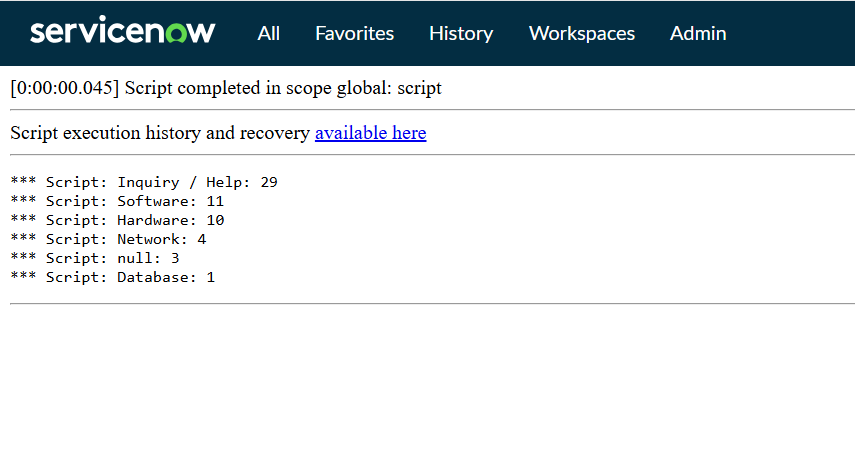
var ga = new GlideAggregate(‘incident’);
ga.addAggregate(‘COUNT’);
ga.groupBy(‘category’);
ga.orderByAggregate(‘COUNT’);
ga.query();
while (ga.next()) {
gs.info(ga.getDisplayValue(‘category’) + ‘: ‘ + ga.getAggregate(‘COUNT’));
}
Output: